

MOFA Visa Check: How to Check Your Saudi Visa by Passport Number
MOFA visa check is done on two official Saudi websites. To track your application, open KSA Visa (ksavisa.sa) and choose Track Application. Enter your application or visa number, your passport number and the captcha. The result shows whether your Saudi visa has been issued. To print an issued e-visa, use Print Visa on the MOFA visa platform (visa.mofa.gov.sa). You’ll need your visa number, a second number such as your passport number, and your nationality.
سعودی ویزا چیک کرنے کے لیے ksavisa.sa پر Track Application کھولیں، اپنا ایپلیکیشن یا ویزا نمبر اور پاسپورٹ نمبر لکھیں اور کیپچا ڈالیں۔ نتیجے میں پتہ چلے گا کہ ویزا جاری ہوا یا نہیں۔ جاری شدہ ویزا پرنٹ کرنے کے لیے visa.mofa.gov.sa پر Print Visa میں ویزا نمبر، پاسپورٹ نمبر اور قومیت (پاکستان) درج کریں۔ ویزا صرف ان سرکاری ویب سائٹس پر چیک کریں، ایجنٹ کی بھیجی ہوئی فائل پر بھروسہ نہ کریں۔
Which site does what?
The Saudi Ministry of Foreign Affairs (MOFA) runs two visa websites. Each check needs a different number, so start with the job you need done.
| What you want to do | Where | What you need |
|---|---|---|
| Track a Saudi visa application | ksavisa.sa > Track Application | Application or visa number, passport number, captcha |
| Check an application on MOFA | visa.mofa.gov.sa home page > Inquiry box | Application number, record number, image code |
| Print an issued e-visa | visa.mofa.gov.sa > Visitor Services > Print Visa | Two numbers (for example visa number and passport number), nationality, image code |
| Check with only your passport number | MOFA visa search [confirm] | Passport number, nationality, visa type, the Saudi embassy that issued it |
| Verify a Pakistan visa (a foreigner coming to Pakistan) | visa.nadra.gov.pk > Verification | Visa reference number, passport number, passport country |
How to track your Saudi visa on KSA Visa?
KSA Visa (ksavisa.sa) is MOFA’s newer visa platform, and it’s the easiest way to check a visa by passport number.
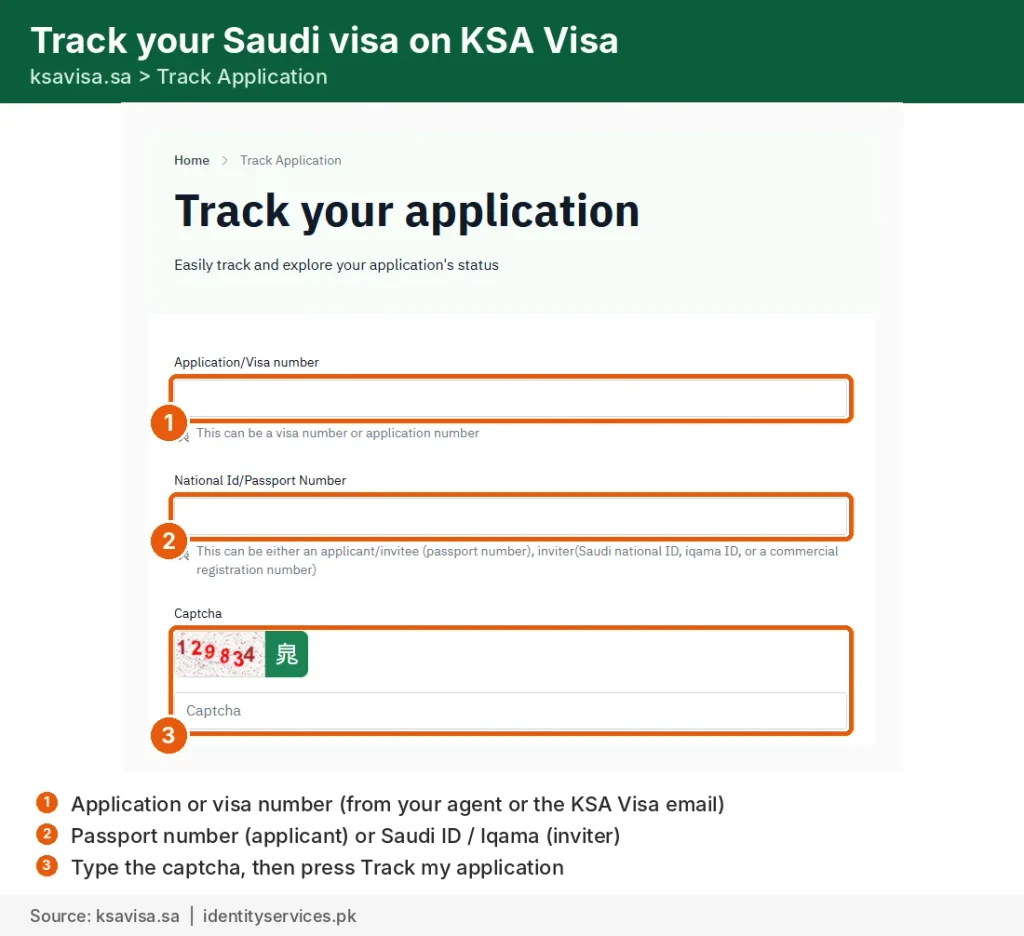
- Open ksavisa.sa and choose Track Application at the top of the page.
- In Application/Visa number, enter the visa number or application number. Your agent or employer gives you this, or it’s in your application confirmation.
- In National ID/Passport Number, enter your passport number. If you’re the person inviting someone, you can use your Saudi ID, Iqama or company registration number instead.
- Type the captcha and press Track my application.
- Scroll down to your application details and press View. A pop-up tells you whether the visa has been issued. Close it to see the visa itself, with the visa number, validity dates and length of stay.
How to check an application on the MOFA visa platform?
The home page of visa.mofa.gov.sa has an Inquiry box (استعلام) for applications already submitted. The page opens in Arabic, so press English at the top first if you prefer.
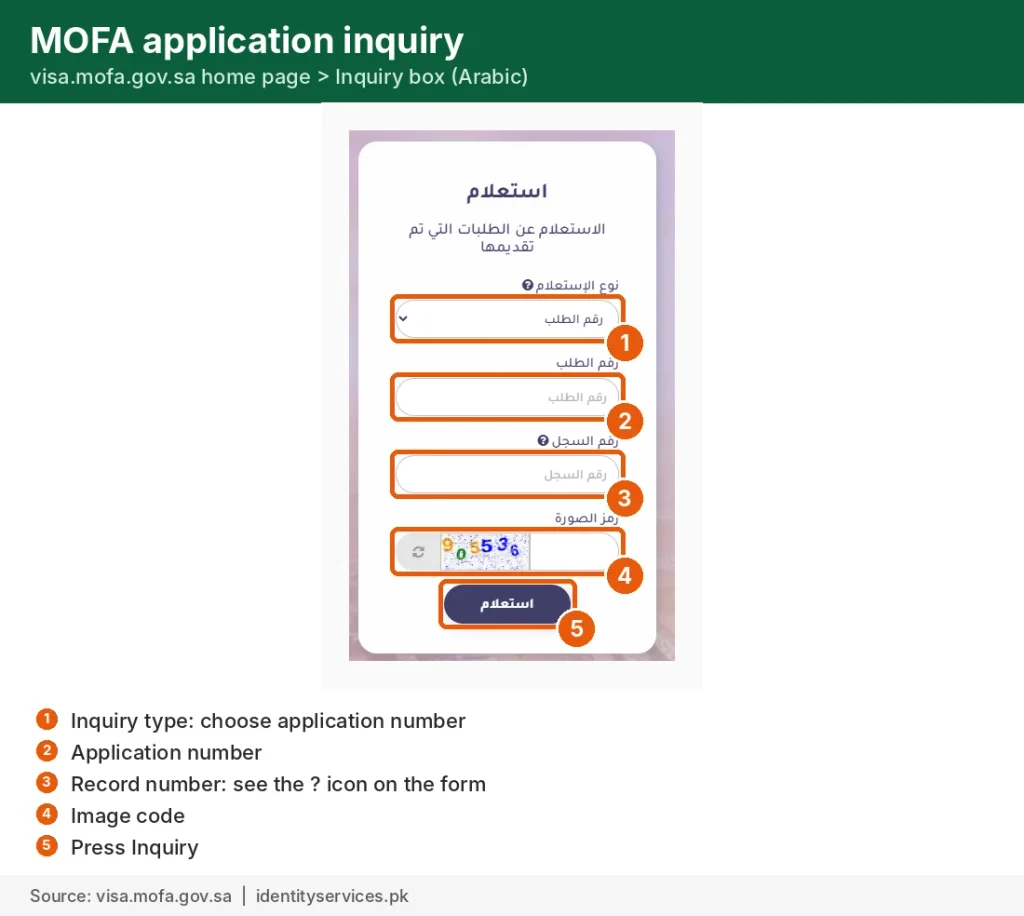
- Inquiry type: leave it on application number.
- Application number: the number you received when the application was submitted.
- Record number: the form’s ? icon explains which number to use. [confirm what it asks for]
- Image code: type the code shown.
- Press Inquiry.
How to print your Saudi e-visa?
Many Saudi visas are now e-visas that you print on A4 paper, with a QR code, instead of a sticker in your passport. Print yours from the MOFA visa platform.
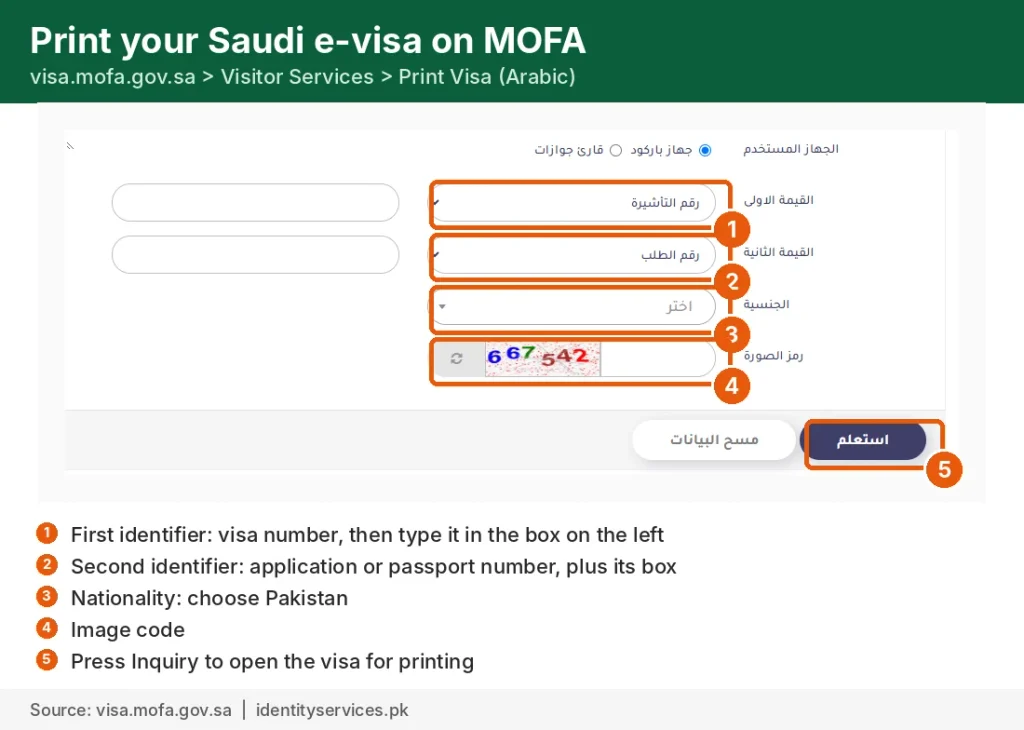
- Open visa.mofa.gov.sa, choose Visitor Services, then Print Visa.
- Leave the device option on the default (barcode).
- First identifier: choose visa number and type it in the box next to it.
- Second identifier: choose application number or passport number and type it in.
- Nationality: choose Pakistan, or the country on your passport.
- Type the image code and press Inquiry. Your visa opens, ready to print.
Carry a printed copy for airline check-in and Saudi immigration.
Check your Saudi visa with only your passport number
If you don’t have a visa or application number, MOFA also has a visa search by passport number. Enter your passport number, nationality and visa type (work, visit, family or Umrah). Then choose the Saudi embassy or consulate that handled your visa, type the image code and search. [Hold this section until the screenshot check below is done.]
Checking a Pakistan visa instead?
Some people search “mofa visa check” to verify a visa for someone coming to Pakistan. That is a different system. Pakistan visas are issued through the Pakistan Online Visa System, and Pakistan’s Ministry of Foreign Affairs tells applicants to verify them at visa.nadra.gov.pk.
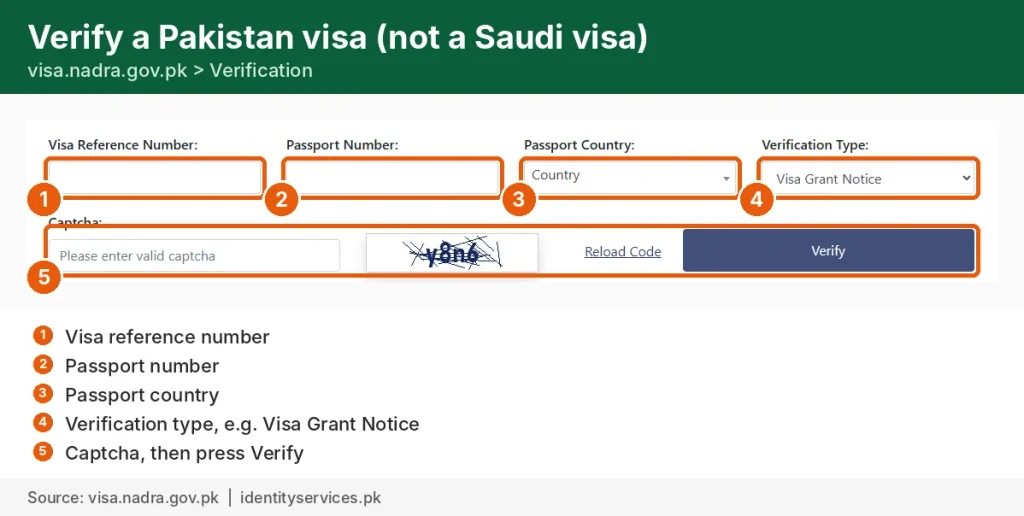
- Open visa.nadra.gov.pk and choose Verification.
- Enter the visa reference number and passport number.
- Choose the passport country and the verification type, for example Visa Grant Notice.
- Type the captcha and press Verify.
For Pakistanis on a Saudi work visa
A visa marked as issued is only the first step. Before you fly from Pakistan, check these:
- Medical result. Your Wafid (GAMCA) medical must show fit and be linked to your visa.
- Protector stamp. Workers going abroad must register with the Protector of Emigrants (Bureau of Emigration and Overseas Employment) before departure. You’ll need a valid CNIC.
- Police character certificate. Many Saudi employers and agents ask for one.
- Passport validity. Check that your passport is valid for at least six months. If it isn’t, renew it before the visa is stamped or printed.
- Licensed agent. Use only a licensed Overseas Employment Promoter, and check its licence on the Bureau of Emigration website.
How to spot a fake Saudi visa?
A real visa always shows up when you check it yourself on ksavisa.sa or visa.mofa.gov.sa.
- Type the website address yourself. Don’t use a link or a “checking site” an agent sends you.
- Your name, passport number and visa type on the result must match your passport exactly.
- A PDF or screenshot on its own proves nothing. If the official site shows no record, don’t pay or travel.
- Be careful with sites that still advertise an “Enjaz visa check”. Enjaz no longer runs visa checks.
FAQ
Can I check my Saudi visa with only my passport number?
KSA Visa needs your application or visa number as well. MOFA’s visa search can find your record with your passport number, nationality, visa type and the Saudi embassy that handled your visa.
Is Enjaz (enjazit.com.sa) still working?
No, not for visa checks. Its services moved to the MOFA visa platform, and visa tracking moved to KSA Visa.
How long does a Saudi visa take to be issued?
MOFA says a visa is usually issued within about three working days after the application is submitted, though some take longer.
What is the difference between a visa number and an application number?
You get the application number when the application is submitted. The visa number is created once the visa is issued and is printed on the visa itself.
My visa shows medical not fit or not passed. What now?
Your visa can’t move forward until the Wafid medical shows fit. Check your result and contact the medical centre or your agent. [Link: N2]
Can I check an Umrah or family visit visa the same way?
Yes. Use Track Application on KSA Visa with the application or visa number and the visitor’s passport number.
I’m already living in Saudi Arabia. Is MOFA where I check my Iqama?
No. MOFA handles visas before you arrive. Your Iqama is handled by Jawazat and HRSD.


