

Wafid Medical Result Check Online by Passport Number
Wafid medical result check is free on the official Wafid website run by the Gulf Health Council. Open the Medical Examinations Results page and choose By Passport Number. Enter your passport number, select your nationality and press Check. You can also search with the Wafid slip number printed on your appointment slip. Your result shows as Fit, Unfit, Referred or Absent. If nothing appears yet, the medical centre has probably not uploaded your report.

Wafid is the Gulf Health Council’s medical examination programme for people going to work or live in Saudi Arabia, the UAE, Qatar, Kuwait, Oman or Bahrain. It used to be called GAMCA, and many people in Pakistan still use that name.
How to check your Wafid medical result?
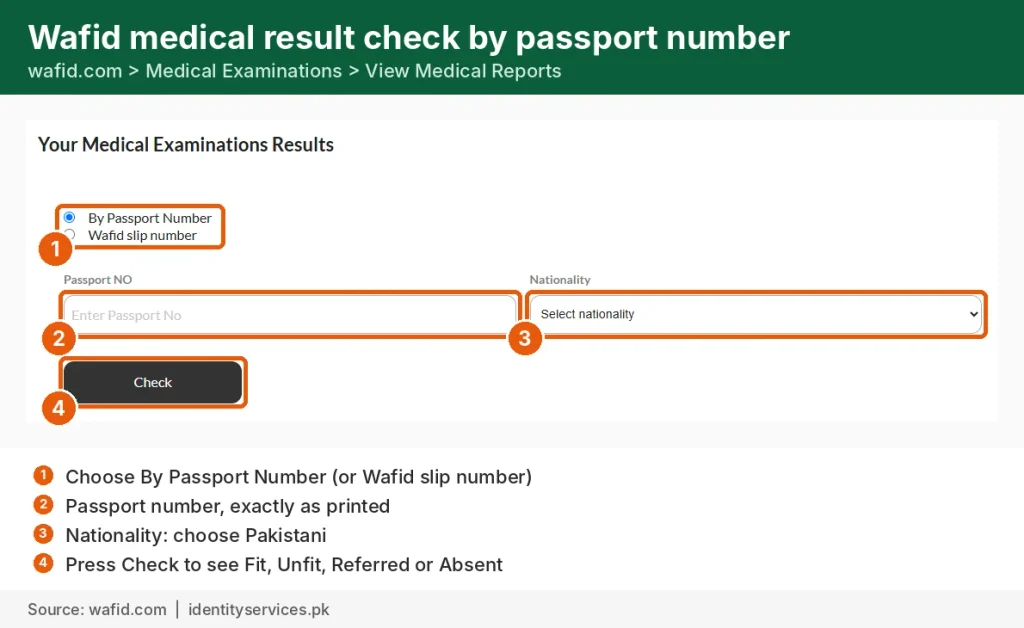
- Open wafid.com and choose View Medical Reports under Medical Examinations.
- Choose By Passport Number.
- Enter your passport number exactly as printed, in capitals with no spaces.
- Select your nationality, for example Pakistani.
- Press Check. Your result appears on the screen.
You can also choose Wafid slip number and enter the GCC slip number from your appointment slip. Both searches show the same result.
What your Wafid result means?
| Status | What it means | What to do |
|---|---|---|
| Fit | You passed the medical for your GCC destination | Tell your agent or employer. Your visa process can continue |
| Unfit | A condition doesn’t meet GCC rules, for example uncontrolled diabetes | Ask your medical centre for the reason. Wafid lets you book a new appointment 2 months after the date of the existing report |
| Referred | The centre needs more tests or a specialist’s opinion | Go back to the centre as they advise |
| Absent | You didn’t attend on your appointment date | Book a new appointment |
| Pending or under process | The centre hasn’t finished or uploaded your report | Check again in a few days |
| No result found | Your details don’t match, or nothing has been uploaded yet | See the fixes below |
How to book a Wafid medical in Pakistan?
You can book the appointment yourself on wafid.com, without an agent.
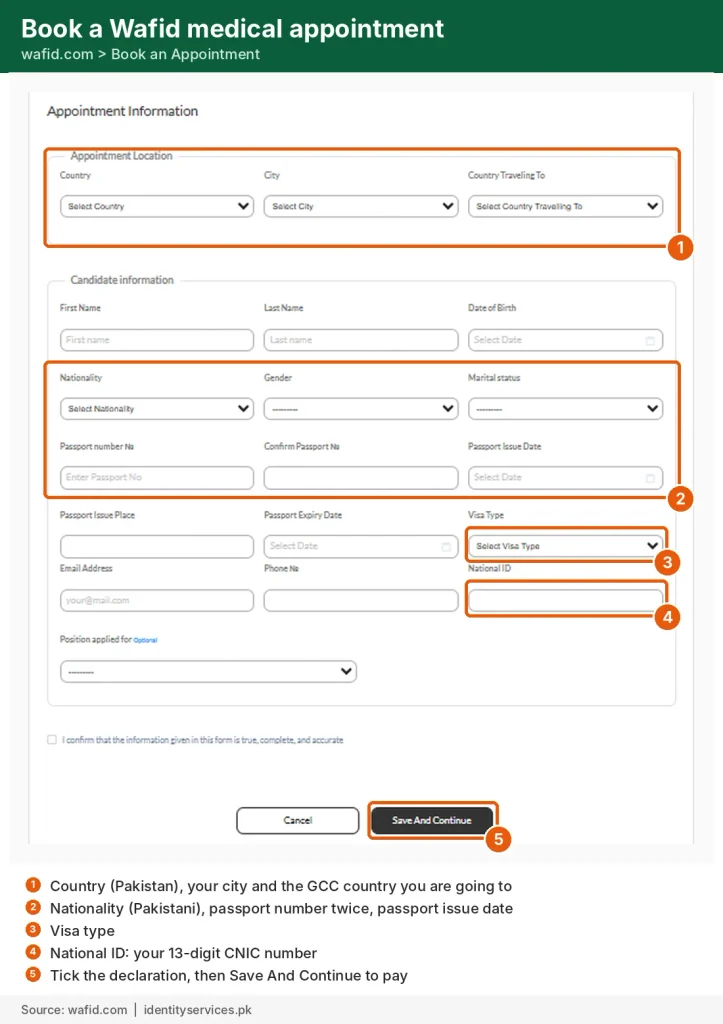
- Open wafid.com and choose Book an Appointment.
- Under Appointment Location, choose Pakistan, your city and the GCC country you’re going to.
- Fill in your name, date of birth, nationality, gender and marital status.
- Enter your passport number twice, plus the passport’s issue date, issue place and expiry date.
- Choose your visa type, then add your email and phone number.
- In National ID, enter your 13-digit CNIC number.
- Tick the declaration, press Save And Continue and pay the fee online.
- Print your appointment slip or save it as a PDF.
You can’t choose the medical centre. Wafid assigns one automatically based on the city and country you selected, and shows it on your slip.
Result not showing? Common fixes
- Passport number typed differently. Enter it exactly as on the passport you used for booking: capitals, no spaces, no dashes.
- Wrong nationality. Choose the nationality on your passport (Pakistani), not your destination country.
- New passport. If you renewed your passport after booking, search with the old number or your slip number.
- Too early. The centre uploads your result after your tests, so allow a few days before you worry.
- Still nothing. Try your Wafid slip number instead. If that fails too, call the centre printed on your slip.
Your Wafid slip explained
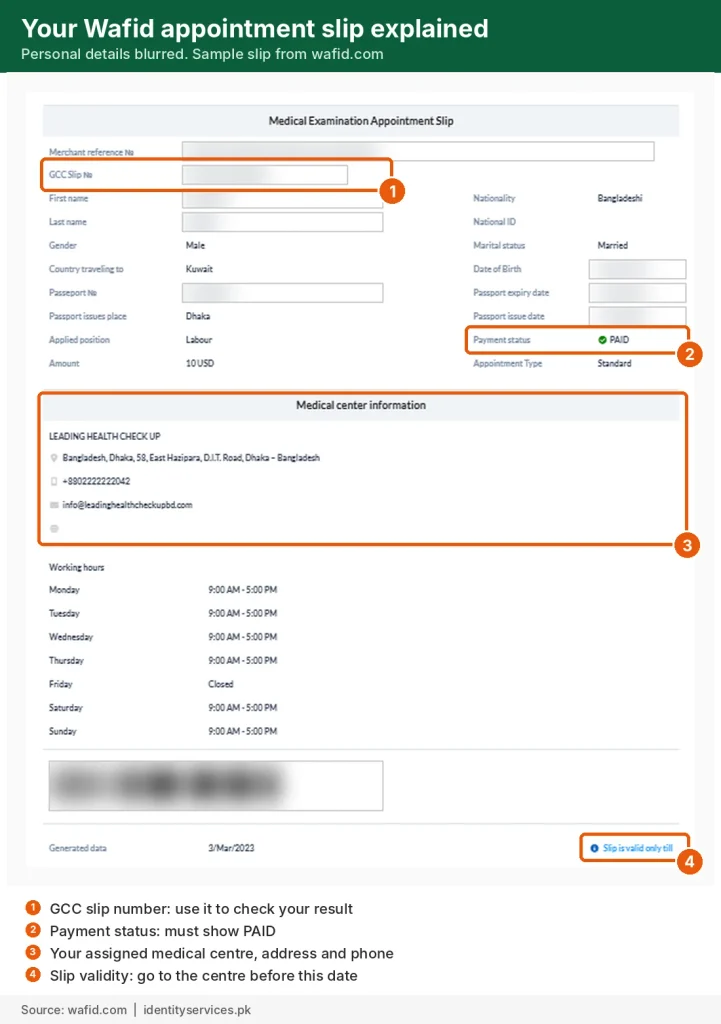
Your appointment slip (also called the GCC slip or Wafid token) has four things to check:
- GCC slip number: use it to check your result later.
- Payment status: it must say PAID.
- Medical centre: the name, address, phone number and opening hours of your assigned centre.
- Validity date: go to the centre before the slip expires. If you want to change city, you have to wait until the current slip has expired.
Take your original passport and the printed slip to the centre. Centres in Pakistan usually also ask for your original CNIC and passport-size photos, so carry them too.
How to reprint or download your Wafid slip?
Lost your slip? Open wafid.com, choose Appointment Slips, enter your passport number and nationality, press Search, then print it or save it as a PDF.
What tests are done in the Wafid medical?
The Gulf Health Council says the medical combines a clinical check, laboratory tests and X-rays, mainly to screen for infectious diseases. In practice it usually includes:
- General check-up: medical history, height, weight, blood pressure, eyesight and colour vision.
- Blood tests: HIV, hepatitis B and C, syphilis, blood sugar, kidney and liver function, and malaria.
- Urine test and chest X-ray, the X-ray mainly to check for tuberculosis.
- Women: a pregnancy test.
- Vaccinations, if your destination country requires them and you have no proof.
The exact list depends on the GCC country you’re going to. Your centre will tell you if you need to fast or bring anything.
How much does a Wafid medical cost?
Wafid’s official appointment fee is $10 per applicant for a Standard appointment, paid online when you book. A Premium appointment costs $25. The medical examination itself is paid at the centre, and the centre sets the price, so ask them before you go.
Agents who book for you charge their own service fee on top. One Pakistani agent site lists Rs 5,000 just for the appointment. You don’t need an agent to book.
After a Fit result: next steps for Pakistanis
- Tell your agent or employer. They link the result to your visa.
- Check your Saudi visa on KSA Visa. Its result also shows a Medical Certificate Status (Passed or Not Passed), which confirms your medical is linked to the visa.
- Get your Protector stamp from the Bureau of Emigration before you fly. You’ll need a valid CNIC.
- Don’t wait too long. A Fit report is generally valid for about 2 months, so finish your visa steps within that time.
Many Saudi work visas from Pakistan also need a skills test under Saudi Arabia’s Skill Verification Program (Takamol) and visa biometrics. Your agent or employer will tell you if your job needs them.
Agent websites and fake slips
Many websites with “GAMCA” or “Wafid” in their name are private booking agents, not the Gulf Health Council.
- The only official site is wafid.com. Type it yourself.
- Checking a result is free. Never pay anyone to “check” your medical.
- To confirm that a slip an agent sent you is real, search its slip number on wafid.com.
- Don’t send photos of your passport or CNIC to unknown WhatsApp numbers.
FAQs
Is Wafid the same as GAMCA?
Yes. Wafid is the current name of the GCC medical examination system that people in Pakistan still call GAMCA.
How long does a Wafid medical result take?
Wafid’s own FAQ says the result appears within 26 days. If it takes longer, contact the centre that examined you.
Can I check my Wafid result on the Wafid app?
No. The WAFID GCC app on Google Play and the App Store is for medical centres applying to join the programme. Check your result on wafid.com in your phone’s browser instead.
Is the online result the same as the full medical report?
No. The online result shows only your status. If your agent or employer asks for the detailed medical report, get it from the centre that examined you.
My result is Unfit. Can I do the medical again?
Wafid lets you book a new appointment 2 months after the date of your existing report. Ask your centre what the result was based on before you rebook.
How do I cancel my Wafid slip or get a refund?
Wafid handles slip cancellations and duplicate-payment refunds by email, listed on its FAQ page. For a duplicate payment, include a copy of the card and your bank statement.
Can I choose my medical centre?
No. Wafid assigns the centre automatically based on the city and destination country you choose when booking.


