
Iqama Check by Passport Number: What Works and What Doesn’t
Iqama check by passport number is only partly possible in Saudi Arabia. Absher has no public service that shows an Iqama from a passport number alone. The reliable route has three steps. First, find your 10-digit border number. Next, enter it with your date of birth on the HRSD (Ministry of Human Resources) inquiry page to see your Iqama number once it is issued. Finally, use that Iqama number to check the expiry date on the national portal without logging in.
خلاصہ: سعودی عرب میں صرف پاسپورٹ نمبر سے اقامہ چیک کرنے کی کوئی سرکاری سہولت نہیں۔ پہلے اپنا 10 ہندسوں کا بارڈر نمبر معلوم کریں، جو ویزے پر لکھا ہوتا ہے یا ابشر پر ویزا نمبر سے مل جاتا ہے۔ پھر وزارت انسانی وسائل (HRSD) کی ویب سائٹ پر بارڈر نمبر اور تاریخ پیدائش ڈال کر اپنا اقامہ نمبر دیکھیں۔ اقامہ نمبر سے میعاد ختم ہونے کی تاریخ بغیر لاگ اِن کے چیک ہو جاتی ہے۔
Which portal accepts which number?
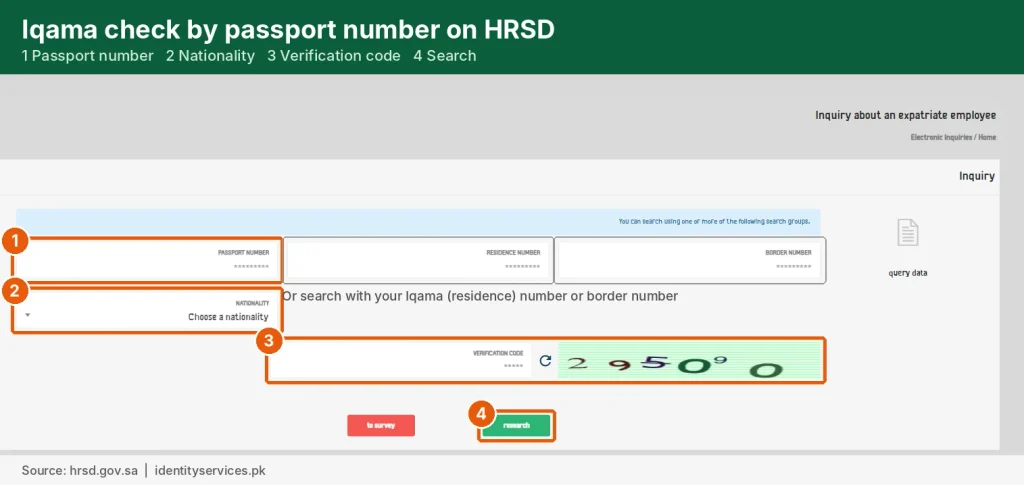
Each Saudi portal looks you up by a different number. The passport number is the one most of them don’t accept.
| Portal | Login needed? | You enter | You see |
|---|---|---|---|
| Absher: Query for Border Number | No | Visa number and visa issue date | Your name and border number |
| HRSD e-services inquiry (es.hrsd.gov.sa) | No account. May send a code to the mobile registered with HRSD | Border number, date of birth, image code | Your Iqama number once issued, and your status |
| National portal: Resident ID expiry (my.gov.sa) | No | Iqama number and image code | Expiry date in Hijri and Gregorian |
| Absher Individuals account | Yes: Iqama number, password and an OTP to a Saudi mobile | Login details | Full Iqama details, expiry, visas |
| Muqeem and Qiwa | Employer only | (your employer does it) | Ask your company’s HR or PRO |
Step 1: Find your border number
Your border number is the 10-digit number Saudi Jawazat records the first time you enter the Kingdom. It is usually written on your Saudi visa in your passport. If you can’t find it, open Absher, choose the Visitors services, then Query for Border Number.
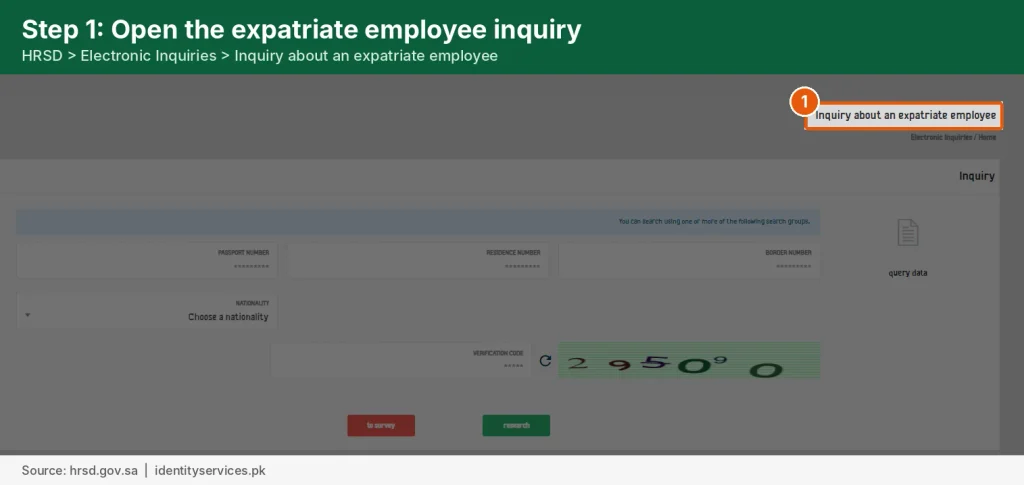
Select Non-GCC Citizen, enter your visa number and visa issue date, type the image code and press Inquire. Match the calendar (Hijri or Gregorian) to your visa, or the query fails.
Tip: don’t type your passport number in the visa number field. That is the most common reason this query returns nothing.
Step 2: Get your Iqama number from HRSD
The Ministry of Human Resources and Social Development (HRSD, formerly MOL) runs a public inquiry page at es.hrsd.gov.sa. Tick the privacy pledge and switch the page to English or Urdu.
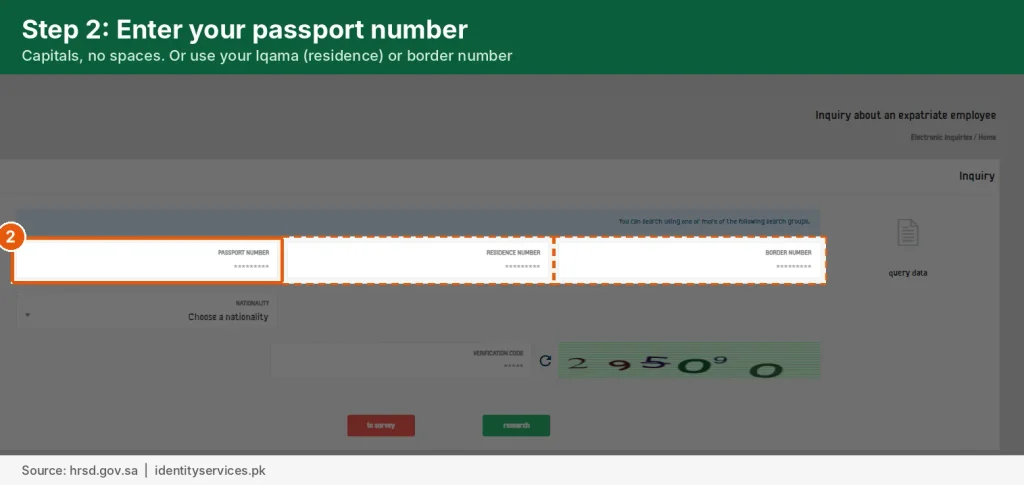
Then enter your border number and date of birth, type the image code and press Next. If your Iqama number appears, your Iqama has been issued. If it doesn’t, issuance is still in progress, so check again in a few days.
Step 3: Check your Iqama expiry date
Once you have the Iqama number, open the Resident ID expiry service on the Saudi national portal (my.gov.sa). Enter your 10-digit Iqama number and the image code.
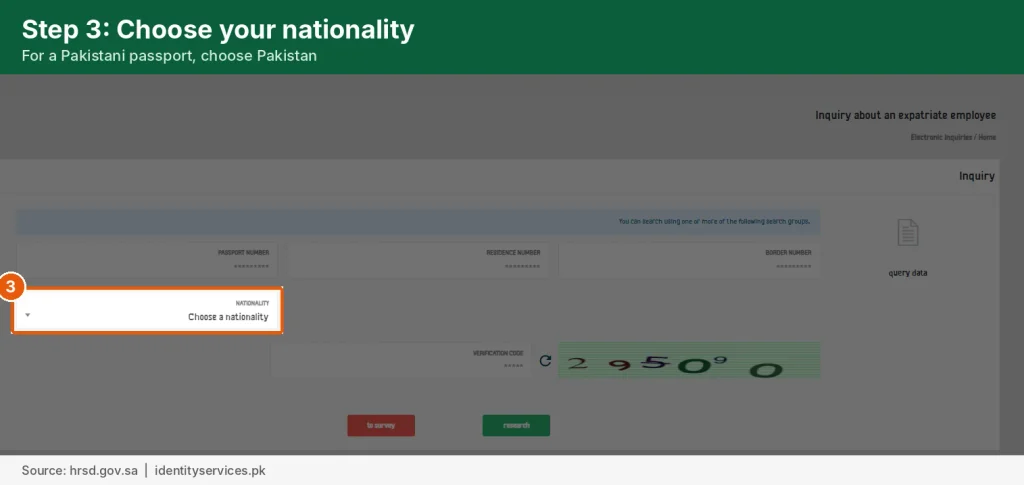
The page shows the expiry date in both the Hijri and Gregorian calendars, with no login or OTP needed. If you already have an Absher account, you can also see the expiry date under My Services after logging in.
New arrival: check if your Iqama is issued
If you have just arrived and finished your medical, you probably don’t have an Absher account yet. Absher needs an Iqama number to register, so you can’t use it to check your own Iqama.
Use the HRSD page in Step 2 with your border number and date of birth. If no Iqama number shows, your employer hasn’t finished the process yet. Ask your company’s HR or PRO, who can see the status in Muqeem or Qiwa.
Why your passport number returns no result?
A search that uses your passport number can come back empty for reasons that have nothing to do with your Iqama.
- You renewed your passport. Saudi records still hold your old passport number until your employer or Jawazat updates it. Search with the old number, or use your border or Iqama number.
- A typing error. Enter letters in capitals with no spaces, exactly as printed on the passport’s photo page.
- The wrong field. A passport number typed into a visa number or Iqama number field always fails.
- Your Iqama isn’t issued yet. Records only appear after your employer completes the Iqama process.
- The code goes to another phone. HRSD can send the code to the mobile your employer registered, which may not be your own number.
For Pakistanis in Saudi Arabia
Pakistani passport numbers have 2 letters followed by 7 digits, for example AB1234567. Type it exactly like that wherever a Saudi form accepts a passport number.
- You renewed your Pakistani passport in Riyadh or Jeddah? Ask your employer to update the new number on your Iqama record before you travel.
- Your passport renewal needs a valid NICOP or CNIC. Check its expiry before you book a passport appointment.
- Children on your Iqama as dependents need their own Pakistani passports, which need a CRC or Juvenile Card.
- Travelling home on an exit re-entry visa? Check your NICOP too.
Frequently Asked Questions
Can I check my Iqama on Absher with my passport number?
No. Absher’s public services look you up by visa number (for the border number) or Iqama number (for expiry). A passport number alone isn’t accepted for an Iqama search.
Is the MOL Iqama check still working?
The Ministry of Labour (MOL) was merged into the Ministry of Human Resources and Social Development (HRSD). Old mol.gov.sa inquiry links now lead to HRSD services, so use es.hrsd.gov.sa instead.
Can I check my Iqama by visa number?
Not directly. Your visa number finds your border number on Absher, and the border number finds your Iqama number on HRSD.
How can I check my Iqama number without Absher?
Use the HRSD inquiry page with your border number and date of birth. You can also ask your employer, who sees the number in Muqeem or Qiwa as soon as it is issued.
What is the difference between a border number and an Iqama number?
Both have 10 digits. The border number is your entry record with Jawazat, and you get it before your Iqama. Resident Iqama numbers start with 2, while Saudi citizen ID numbers start with 1.
Can MOFA’s website show my Iqama status?
No. The Ministry of Foreign Affairs visa site tracks your visa application before you travel. Once you are in Saudi Arabia, your Iqama is handled by Jawazat and your employer.
Can I check my medical report or health insurance by passport number?
[Hold this answer until the open check below is done.]
Before publishing
The sources disagree on one point that matters, so please check it on the live site before this goes up.
- HRSD inquiry form (most important). Open es.hrsd.gov.sa from a Saudi or Pakistani connection and screenshot the form. One guide says it takes only border number and date of birth with no code. Another says it also accepts passport or Iqama number and sends an OTP. The AI Overview says passport or border number plus OTP. If passport number works there, I’ll change the answer capsule to say “yes, on HRSD only”.
- National portal link. Confirm my.gov.sa/en/services/269423 opens the Resident ID expiry service, then add it as the link in Step 3.
- Medical and insurance FAQ. Tell me if you want this answer. I’d need to check which sites currently handle it before writing it.
- Internal links. Replace the bracketed link notes with your real URLs.
- Images. Add one flow graphic (passport, then border number, then Iqama number, then expiry date) plus an Urdu version, in the same style as topic 21. English alt text: “Iqama check by passport number: find border number on Absher, get Iqama number on HRSD, check expiry on my.gov.sa”. Urdu alt text: “پاسپورٹ نمبر سے اقامہ چیک کرنے کا طریقہ: بارڈر نمبر، اقامہ نمبر اور میعاد”.
- Screenshots. If you can take your own screenshots of the Absher and HRSD forms (blurring personal data), add them. No competitor has original screenshots.
Sources
- Gulf News: What is a Saudi border number (Absher Query for Border Number steps)
- KSA Expats: Check if new Iqama is issued (HRSD steps with border number, reviewed Dec 2025)
- Saudi Life Guide: Border number check (competitor; no public passport-to-Iqama service)
- Wathim: Iqama expiry check without Absher (HRSD inputs with OTP; my.gov.sa expiry service)
- KSA Guides: MOL Iqama check 2026 (MOL services moved to HRSD)
- Your SERP export for “iqama check by passport number”, 30 Oct 2026


