

The B-Form, officially called the Child Registration Certificate (CRC), is issued by NADRA to Pakistani children under 18 years of age under Rule 18 of the NADRA (NIC) Rules, 2002. It assigns a permanent 13-digit identity number that becomes the child’s CNIC number at age 18. Registration is legally required under Section 9(1) of the NADRA Ordinance, 2000 within one month of birth. The fee is Rs 50 for normal processing (7 days) or Rs 500 for executive processing (1 day). Apply online through the Pak-ID app or at any NADRA Registration Centre, Mega Centre, Mobile Registration Van, eSahulat franchise, or overseas mission.
Last Updated: September 2026

NADRA introduced new rules for online B-Form applications in August 2026. Parents can now apply entirely from home through the Pak-ID app for children under one year of age. For children aged 3 and above, biometric capture (photograph, IRIS, fingerprints by age) still requires a visit to a NADRA Registration Centre. The 3-stage biometric system (birth → age 3 → age 10) is now fully enforced.
What Is a B-Form (CRC)?
The B-Form is the Child Registration Certificate (CRC) issued by NADRA to register Pakistani children under 18 years of age. It serves as the child’s first official identity document in Pakistan’s national database.
B-Form and CRC refer to the same document. “B-Form” is the commonly used name. Child Registration Certificate (CRC) is the legal and official term used by NADRA.
The B-Form assigns a permanent 13-digit identity number, this same number becomes the child’s CNIC number when they turn 18. The number never changes throughout their life.
Legal requirement: Under Section 9(1) of the NADRA Ordinance, 2000, every parent or legal guardian must register a child within one month of birth. Failure to register constitutes an offence under Section 30(1)(a) of the same ordinance.
What B-Form Is Used For?
| Use | Details |
| Child passport application | Mandatory for passport issuance for children under 18 who do not hold a NICOP. Directorate General of Immigration and Passports requires it. |
| School admission and enrolment | Required for official school registration, examination registration, and educational records across Pakistan. |
| Family Registration Certificate (FRC) | Child appears on the parent’s FRC using the B-Form number. |
| Future CNIC issuance at age 18 | The 13-digit B-Form number carries forward as the CNIC number. CRC is the prerequisite for first-time CNIC. |
| Juvenile Card application | CRC must exist in NADRA’s system before a Juvenile Card can be issued online. |
| Banking for minors | Required for opening children’s savings accounts at Pakistani banks. |
| SIM registration (15+) | Children aged 15 and above can register a SIM using their B-Form number. |
| Government welfare programs | BISP, Ehsaas, and other programs require each family member’s identity registration. |
| Healthcare verification | Required for identity verification at government healthcare facilities. |
The B-Form (CRC) is mandatory for child passport applications, school enrolment, Family Registration Certificate inclusion, banking for minors, and future CNIC issuance at age 18. The 13-digit B-Form number becomes the child’s permanent CNIC number and never changes.
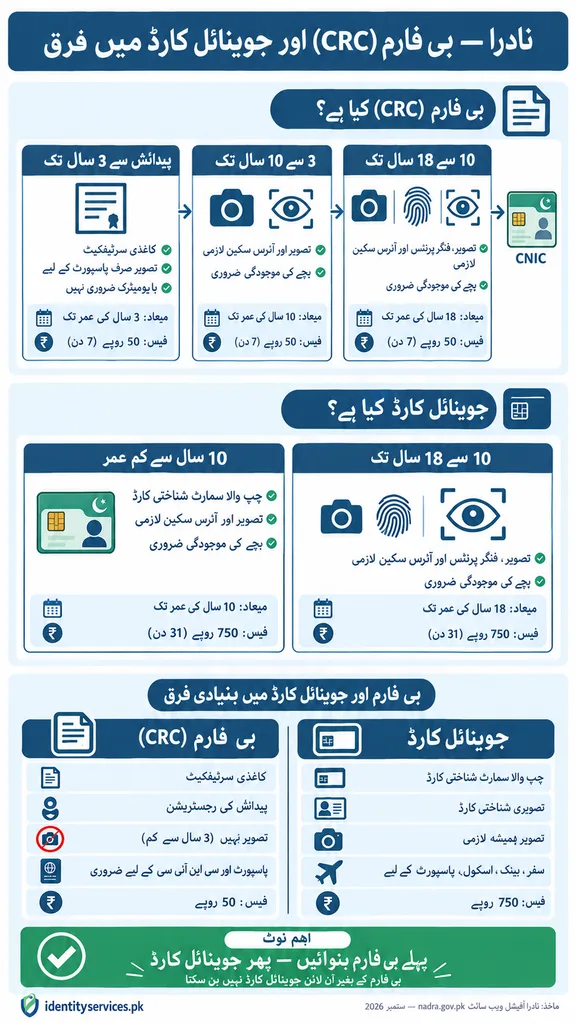
Alt text: NADRA specimen documents showing Child Registration Certificate for children below 3 years, CRC for children aged 3 to 18 years, and Juvenile Card with photograph and chip
3-Stage Biometric and Expiry System (Official NADRA Schedule)
NADRA issues the B-Form in age-based stages. Each stage captures different biometric data and has a different expiry. At each milestone (age 3 and age 10), the CRC must be renewed with updated biometrics.
CRC Biometric and Expiry Schedule
| Document | Age Bracket | Biometrics Captured | Child Presence | Expiry |
| CRC | Up to 3 years | No biometrics required. Photograph required only if CRC is for passport issuance. | Only if for passport purpose | On attaining age 3 |
| CRC | 3 to 10 years | Photograph & IRIS | Mandatory | On attaining age 10 |
| CRC | 10 to 18 years | Photograph, Fingerprints & IRIS | Mandatory | On attaining age 18 |
| Juvenile Card | Up to 10 years | Photograph & IRIS | Mandatory | On attaining age 10 |
| Juvenile Card | 10 to 18 years | Photograph, Fingerprints & IRIS | Mandatory | On attaining age 18 |
NADRA’s B-Form system operates in three stages. Stage 1 (birth to age 3): no biometrics, no child presence required unless for passport. Stage 2 (age 3 to 10): photograph and IRIS scan mandatory, child must be present. Stage 3 (age 10 to 18): photograph, fingerprints, and IRIS scan mandatory, child must be present. Each stage expires and must be renewed at the next age milestone.
Important: Each new CRC replaces the previous version. Parents must update the CRC at each milestone (age 3 and age 10). Failure to update may cause delays in passport processing, school verification, or future CNIC issuance.
What Is a B-Form Number?
The B-Form number is a unique 13-digit identity number printed on the CRC, following the same format as the adult CNIC number (XXXXX-XXXXXXX-X). It is permanently assigned at the time of registration and becomes the CNIC number when the child turns 18.
Where to find the B-Form number:
• On the CRC document: Printed at the top, below the child’s name
• Pak-ID app: Family → CRC / B-Form → the number appears on the digital certificate in the ID Vault
• Family Registration Certificate (FRC): Listed under the children’s section of the parent’s FRC
• SMS: Send your tracking ID to 8400 response includes the B-Form number after processing
Lost the physical document? Retrieve the number through the Pak-ID app, your FRC, or by calling NADRA at 1777.
Documents Required (Official NADRA Requirements)
For Inland Births (Within Pakistan)
• Computerized Birth Registration Certificate (CBRC) issued by the Union Council, Municipal Committee, or Cantonment Board
• Important: Only the computerized (digitally printed) version is accepted. Manual (handwritten) birth certificates are NOT accepted for B-Form processing. If your Union Council only issued a manual certificate, request a computerized version first.
For Abroad Births (Outside Pakistan)
• Detailed Birth Certificate issued by the relevant foreign authority, OR
• S-1 Form (as applicable, issued by Pakistani Embassy/Mission)
Parent / Guardian Identity (Mandatory)
• At least one parent must hold a valid CNIC or NICOP
• Parent must attend in person for biometric verification
• If both parents are deceased or unavailable: court-issued guardianship certificate + guardian’s valid CNIC/NICOP
• Official NADRA rule: Adoptive parents cannot apply without a legal adoption or guardianship order from a competent court.
What Is CBRC (Computerized Birth Registration Certificate)
CBRC stands for Computerized Birth Registration Certificate. It is the digitally printed birth certificate issued by the Union Council, Municipal Committee, or Cantonment Board after a child’s birth is registered. NADRA requires the CBRC as a mandatory supporting document when applying for a B-Form.
| Feature | CBRC (Computerized) | Manual Birth Certificate |
| Format | Digitally printed, tamper-resistant | Handwritten |
| Accepted by NADRA | Yes — required for B-Form | No — not accepted |
| Contains | Date of birth, place of birth, gender, parents’ names | Same information but in handwritten format |
| How to get | Apply at Union Council, Municipal Committee, or Cantonment Board | Older records — request computerized version |
Where to Apply: 7 Official Channels
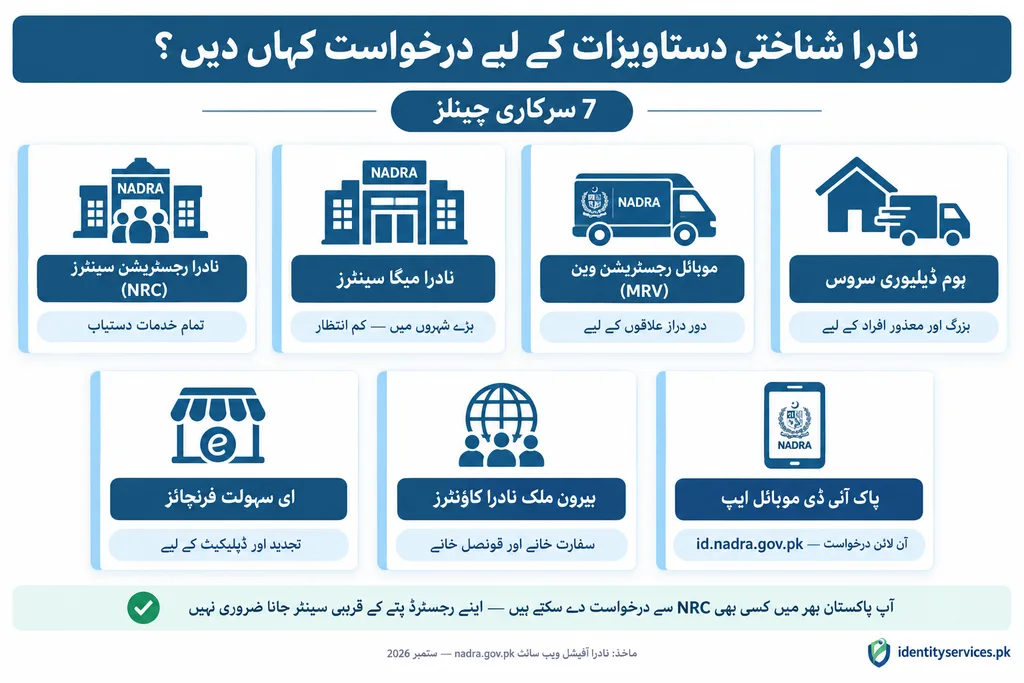
| Channel | Best For |
| NADRA Registration Centres (NRCs) | Most applicants full services, biometric capture available |
| NADRA Mega Centres | Major cities (Lahore, Karachi, Islamabad) shorter queues, extended hours |
| Mobile Registration Vans (MRVs) | Rural and remote areas without a nearby NRC visits on published schedule |
| Home Delivery Service | Elderly or medically restricted parents/guardians who cannot visit an NRC |
| eSahulat Franchises | Quick applications where limited CRC services are available |
| Overseas Counters / Centres | Pakistani embassies and consulates for overseas parents |
| PakID Mobile App (id.nadra.gov.pk) | Online application fully digital for children under 1 year; biometric visit required for older children |
You can apply at any NRC nationwide you are not restricted to the one nearest to your registered address.
How to Apply for B-Form Online (Pak-ID App)?
App: Pak Identity (PakID) Google Play and App Store
Portal: id.nadra.gov.pk
Step 1: Log in to Pak-ID.
Sign in to your Pak-ID account or create a new account using your CNIC number and mobile number. Verify via OTP.
Step 2: Navigate to CRC service.
From the Home screen, go to Family → CRC / B-Form.
Step 3: Select applicant category.
Choose ‘Myself’ or ‘My Blood Relatives’ as applicable.
Step 4: Choose processing priority.
Normal (Rs 50, 7 days) or Executive (Rs 500, 1 day). No urgent category exists for CRC.
Step 5: Review and complete child information.
Review any pre-filled information from NADRA’s system. Add or correct missing details manually.
Step 6: Verify parent details.
Confirm and verify the parent’s identity information.
Step 7: Provide disability information.
Enter disability details if applicable. Leave blank if not applicable.
Step 8: Capture biometrics (where required).
Upload the child’s photograph. For children aged 10-18: capture fingerprints. For children aged 3-10: photograph and IRIS. For children under 3: no biometrics needed unless CRC is for passport.
Step 9: Parent biometric verification.
Verify the fingerprints of one parent as part of authentication.
Step 10: Upload required documents.
Upload the Computerized Birth Registration Certificate and any other required documents.
Step 11: Review and submit.
Carefully review all entered information before submission. A tracking ID is generated.
Step 12: Pay the fee after approval.
Fee is charged after NADRA approves the application. Pay via debit/credit card, JazzCash, EasyPaisa, or eSahulat franchise.
After submission: The CRC is issued in PDF format and appears in the ID Vault within the Pak-ID account. Track via the app or SMS your tracking ID to 8400.
Parents can apply for a B-Form online through the Pak-ID mobile app. Navigate to Family, select CRC/B-Form, upload the birth certificate, complete biometric verification, and pay Rs 50 (normal, 7 days) or Rs 500 (executive, 1 day). The digital CRC appears as a PDF in the Pak-ID app’s ID Vault after processing.
How to Apply at a NADRA Registration Centre (In Person)?
Step 1: Visit the nearest NRC.
Approach any NADRA Registration Centre during working hours. Book an appointment through the PakID app to skip the walk-in queue.
Step 2: Obtain a token.
Receive a Queue Matic token from the reception counter.
Step 3: Parent biometric verification.
One parent or guardian completes biometric verification using their CNIC or NICOP.
Step 4: Child biometric capture.
Age-dependent: under 3 — no biometrics (photograph only if for passport). Age 3-10 — photograph and IRIS. Age 10-18 — photograph, fingerprints, and IRIS. Child must be present for ages 3+.
Step 5: Data entry and review.
Child and parent information is entered into the system and reviewed for accuracy.
Step 6: Attestation.
Attestation by spouse, blood relative, guardian, or gazetted officer. If no eligible relative is present, an attestation form is issued for completion and resubmission.
Step 7: Fee payment.
Pay Rs 50 (normal, 7 days) or Rs 500 (executive, 1 day). Cash at NRC or digital payment.
Step 8: Collection.
CRC is printed and handed over after processing. Delivery within Pakistan: Rs 165 additional.
B-Form Fee Structure (2026 Official NADRA Rates)
| Service | Category | Fee (PKR) | Processing Time |
| New CRC | Normal | Rs 50 | 7 days |
| New CRC | Executive | Rs 500 | 1 day |
| CRC Renewal | Normal | Rs 50 | 7 days |
| CRC Renewal | Executive | Rs 500 | 1 day |
| CRC Modification | Normal | Rs 50 | 7 days |
| CRC Modification | Executive | Rs 500 | 1 day |
| CRC Duplicate (lost/damaged) | Normal | Rs 50 | 7 days |
| CRC Duplicate | Executive | Rs 500 | 1 day |
| CRC/CNIC Cancellation (death) | — | Free (Rs 0) | 1 day |
| Additional Fees | Amount |
| Delivery within Pakistan | Rs 165 |
| Delivery abroad | Varies by country |
| Updating Non-Printable Fields (NRC) | Rs 100 / 2 days |
| Updating Non-Printable Fields (PakID app) | USD 5 / 2 days |
Important: Processing timeline starts after fee payment, not after application submission. Unlike CNIC processing, CRC does not have an urgent category only Normal (7 days) and Executive (1 day). NADRA charges the same fee for new issuance, renewal, modification, and duplicate.
The B-Form (CRC) fee is Rs 50 for normal processing (7 working days) and Rs 500 for executive processing (1 working day). NADRA charges the same fee for new issuance, renewal, modification, and duplicate CRC. Cancellation due to death is free and processed in 1 day. Processing timeline starts after fee payment.
Payment methods:
• At NRC: Cash
• Via Pak-ID app: Debit/credit card (Visa/Mastercard), JazzCash, EasyPaisa
• eSahulat franchises: Accepted at select locations
B-Form Renewal
Eligibility: Any CRC / Juvenile Card holder. As per Rule 12 of NADRA (NIC) Rules, 2002, a citizen shall apply for renewal not later than one month after expiry.
Required: Existing CRC/Juvenile Card number only. No additional documents for straightforward renewal.
When to renew: CRC expires at age 3, then at age 10, then at age 18. Renew before each milestone to avoid gaps in the child’s identity record.
Fee: Rs 50 (normal, 7 days) / Rs 500 (executive, 1 day). Apply via Pak-ID app or at any NRC.
B-Form Modification (Name, DOB, Parent Details Correction)
Eligibility: Any CRC / Juvenile Card holder requiring correction or update. Per Rule 13 of NADRA (NIC) Rules, 2022.
Requirements: Refer to NADRA Registration Policy Chapter ‘Change / Correction in Identity Documents’.
Common corrections:
• Name correction: Apply for CRC modification with supporting documentation. Name can also be corrected during conversion from CRC to Juvenile Card.
• Date of birth correction: Birth certificate must be corrected at the Union Council first. Only after the Union Council corrects it can NADRA update the CRC record. Age modification fees apply (Rs 1,000 to Rs 10,000 depending on change amount).
• Father’s name correction: Can be corrected during modification or during conversion from CRC to Juvenile Card.
• Parents’ marital status not updated: Marriage record must be updated in NADRA before CRC modification can proceed.
Fee: Rs 50 (normal, 7 days) / Rs 500 (executive, 1 day). Same as new issuance.
Duplicate B-Form (Lost, Damaged, Replacement)
- Eligibility: Any CRC / Juvenile Card holder whose document is lost, stolen, or damaged.
- Required: CRC/Juvenile Card number only. The duplicate is issued from existing NADRA records.
- Fee: Rs 50 (normal, 7 days) / Rs 500 (executive, 1 day). Same as new issuance.
Apply via Pak-ID app (Family → CRC / B-Form → Duplicate) or at any NRC with parent’s valid CNIC.
Important: The duplicate CRC replaces the previous document. If the lost B-Form is found after the duplicate is issued, the original becomes invalid.
B-Form Cancellation
NADRA can cancel a CRC in the following cases:
• Death of the child: Free (Rs 0), processed in 1 working day. Apply at any NRC with the death certificate.
• Duplicate records: If a child has duplicate CRC entries in NADRA’s database, one record must be cancelled before further processing. DUP clearance fee: Rs 1,000 (similar particulars) to Rs 10,000–20,000 (different particulars).
• Surrender of nationality: CRC is cancelled through NADRA’s formal cancellation procedure with nationality surrender documentation.
B-Form vs Birth Certificate — What Is the Difference
| Feature | Birth Certificate (CBRC) | B-Form (CRC) |
| Issuing Authority | Union Council, Municipal Committee, or Cantonment Board | NADRA |
| Purpose | Records the event of birth (date, time, place, parents) | Registers the child’s identity in the national database |
| Identity Number | No national identity number assigned | Assigns a unique 13-digit identity number |
| Required For | Obtaining B-Form, school admission proof | Passport, CNIC at age 18, FRC, government verification |
| Validity | Permanent record of birth | Expires at age 3, 10, 18 (progressive stages) |
| Biometrics | Not required | Required from age 3+ (photograph, IRIS, fingerprints by age) |
| Application Method | In-person at Union Council | Online via Pak-ID or at NADRA Registration Centre |
| Which comes first? | First — prerequisite for B-Form | Second — requires birth certificate before issuance |
The birth certificate and B-Form are two different documents issued by two different authorities. The birth certificate is issued by the Union Council and records the event of birth. The B-Form is issued by NADRA and registers the child’s identity in the national database with a unique 13-digit number. A Computerized Birth Registration Certificate must be obtained first before NADRA can issue a B-Form.
B-Form (CRC) vs Juvenile Card — Which Does Your Child Need
| Feature | B-Form (CRC) | Juvenile Card |
| Format | Paper document / PDF | Chip-based Smart Card (like CNIC) |
| Age Eligibility | Birth to 18 years | Under 18 years |
| Photograph | Required from age 3+ | Always required |
| Fingerprints | Required from age 10+ | Required from age 10+ |
| IRIS | Required from age 3+ | Required at all ages |
| Child Presence | Required from age 3+ (except infant for non-passport CRC) | Always required |
| Primary Use | Birth registration, passport, CNIC preparation | Photo ID for travel, banking, school, government services |
| Prerequisite | Birth certificate from Union Council | CRC or birth certificate |
| Online Application | Available via Pak-ID | Available via Pak-ID (requires existing CRC) |
| Fee | Rs 50 (normal, 7 days) / Rs 500 (executive, 1 day) | Rs 750 (normal, 31 days) / Rs 2,500 (executive, 9 days) |
Which one should you get? Every child needs a B-Form — it is the foundational identity registration. The Juvenile Card is optional but recommended for children who need a physical photo ID for passport, travel, banking, or school. A child can hold both simultaneously.
How to Track Your B-Form Application?
• Pak-ID app: Login → Family → CRC / B-Form → view real-time status linked to your tracking ID.
• SMS to 8400: Send your 10-digit tracking ID to 8400. Instant automated status reply.
• NADRA helpline: Call 1777 (mobile) or +92 51 111 786 100 (landline/overseas). Provide tracking ID.
Statuses: Application Submitted → Verification & Biometric Stage → Fee/Payment Confirmed → Processing → Completed (PDF in ID Vault or ready for collection).
B-Form application status can be tracked through three official NADRA channels. Send your 10-digit tracking ID via SMS to 8400 for instant status. Log in to the Pak-ID app under Family then CRC/B-Form for real-time updates. Call NADRA helpline on 1777 or +92 51 111 786 100 for phone-based tracking.
How to Download B-Form Online?
After processing is complete, the digital CRC is available as a PDF in the Pak-ID app’s ID Vault.
Step 1: Open the Pak-ID app and log in.
Step 2: Go to Family → CRC / B-Form.
Step 3: Select the processed application.
Step 4: View and download.
The CRC appears as a PDF. Tap to view, then use your device’s share or save option to download.
Important: Download is only available for applications submitted through Pak-ID. For NRC applications, collect the physical CRC in person. NADRA does not offer a public website download by CNIC number. Third-party websites claiming ‘B-Form download by CNIC’ are not official.
After processing is complete, the B-Form is available as a digitally signed PDF in the ID Vault within the Pak-ID mobile app. Log in to Pak-ID, go to Family, select CRC/B-Form, and download the PDF. NADRA does not provide a direct website download by CNIC number. The digital CRC in PDF format is an official, legally valid document.
Is B-Form Required for a Child’s Passport?
Yes. An original B-Form (CRC) issued by NADRA is mandatory for child passport applications in Pakistan. Children under 18 who do not hold a NICOP must submit their CRC to the Directorate General of Immigration and Passports.
- For children aged 10+: B-Form must include photograph and fingerprints under updated biometric requirements
- Original CNIC or NICOP of both parents must be presented
- Child must be accompanied by a parent or legal guardian at the passport office
- Original B-Form plus a photocopy is submitted during the passport application
- An FRC or NICOP may be accepted as an alternative in some cases
An original B-Form issued by NADRA is mandatory for a child’s passport application in Pakistan. Children under 18 who do not hold a NICOP must submit their CRC to the Directorate General of Immigration and Passports. For children aged 10 and above, the B-Form must include a photograph and fingerprints. Without a valid B-Form, a child passport application cannot proceed.
B-Form for Overseas Pakistani Children
Overseas Pakistani parents can apply for their child’s B-Form through:
• Pak-ID app: Same online process as domestic applicants. Fee charged in PKR after currency conversion.
• Pakistani embassy or consulate: Visit the NADRA counter at the nearest Pakistani mission with the child and required documents.
• For children born abroad: Submit a Detailed Birth Certificate from the foreign authority or S-1 Form issued by the Pakistani Embassy.
Official NADRA FAQ confirms: If both parents live abroad and the child is in Pakistan, a blood relative or legal guardian in Pakistan can apply on behalf with the child present.
Contact and Helpline
| Channel | Contact | Use |
| Mobile helpline | 1777 | Application status, requirements, guidance (24/7) |
| Landline | +92 51 111 786 100 | Same — works from any phone including overseas |
| [email protected] | Written complaints, formal escalation | |
| In-person | Any NADRA Registration Centre | Document submission, biometric capture, collection |
Keep your tracking ID available when calling. Do not share tracking IDs publicly or on social media.
Frequently Asked Questions
Is B-Form and CRC the same document?
Yes. B-Form and Child Registration Certificate (CRC) refer to the same NADRA document. “B-Form” is the popular term. CRC is the legal name.
Is B-Form mandatory for all children?
Yes. Under NADRA Ordinance Section 9(1), parents or guardians are legally required to register a child within one month of birth.
What is the B-Form fee?
Rs 50 for normal processing (7 days) and Rs 500 for executive processing (1 day). Same fee for new, renewal, modification, and duplicate.
Can I apply for B-Form online?
Yes. Apply through the Pak-ID mobile app under Family → CRC / B-Form. For children under 1 year, the process can be completed entirely online. For older children, biometric capture requires a visit to an NRC.
Does B-Form expire?
Yes. CRC expires progressively: at age 3 (first CRC), at age 10 (renewed with photograph and IRIS), and at age 18 (child transitions to adult CNIC). Renew before each milestone.
Can CRC be issued if the child’s birth is not registered with the Union Council?
No. A Computerized Birth Registration Certificate from the Union Council is a mandatory prerequisite. Register the birth first, then apply for B-Form.
Can CRC be issued if the father is a foreigner?
Yes. NADRA issues CRC where the father is a foreign national, provided the mother is a Pakistani citizen with a valid CNIC and the child’s birth is properly documented.
Can adoptive parents apply for B-Form?
Only with a guardianship certificate issued by a Guardian Court. Without legal documentation of guardianship, the application cannot proceed.
What if the date of birth on B-Form differs from the birth certificate?
Correct the birth certificate at the Union Council first. Only after the Union Council corrects it can NADRA update the CRC record through CRC modification.
Can overseas parents apply for B-Form?
Yes. Through the Pak-ID app or at any Pakistani embassy/consulate. If both parents are abroad and the child is in Pakistan, a blood relative or guardian can apply with the child present.
What happens when the child turns 18?
The CRC expires. The individual applies for an adult CNIC. The same 13-digit number carries forward. First standard CNIC is free.
Can B-Form be used for a child’s passport?
Yes. B-Form is mandatory for child passport issuance. Children aged 10+ must have an updated CRC with photograph and fingerprints.
How do I download B-Form online?
After processing, the B-Form appears as a PDF in the ID Vault in the Pak-ID app. Go to Family → CRC / B-Form. NADRA does not offer a public download by CNIC number.
How do I get a duplicate B-Form?
Apply through Pak-ID (Family → CRC → Duplicate) or at any NRC. Fee: Rs 50 (normal, 7 days) / Rs 500 (executive, 1 day). Same as new issuance.
What is CBRC?
CBRC stands for Computerized Birth Registration Certificate. It is the digitally printed birth certificate from the Union Council. NADRA requires this as a mandatory document before issuing a B-Form. Manual (handwritten) certificates are not accepted.
Can B-Form be cancelled?
Yes. Cancellation due to death (free, 1 day), duplicate records (DUP clearance), or nationality surrender. Apply at any NRC with supporting documents.
Can one parent apply if the other is deceased?
Yes. The surviving parent with a valid CNIC or NICOP can apply. If both parents are deceased, a court-appointed legal guardian must apply.
What if parents’ marital status is not updated in NADRA?
Update the marriage record in NADRA before CRC processing. Submit a marriage certificate for marital status update.
Can the child’s name be changed on the B-Form?
Yes. Apply for CRC modification through Pak-ID or at an NRC. The name can also be corrected during conversion from CRC to Juvenile Card.
What is the difference between B-Form and Juvenile Card?
B-Form is a paper registration certificate. Juvenile Card is a chip-based Smart Identity Card with photograph. Every child needs a B-Form. Juvenile Card is optional but recommended for passport, travel, banking, and school.