
NADRA Complaint: How to File, Track and Follow Up
A NADRA complaint is filed online on NADRA’s complaint portal (complaints.nadra.gov.pk) by choosing a complaint category and describing the problem, by calling the 24/7 helpline 1777 from a mobile or +92 51 111 786 100 from a landline or abroad, or by emailing [email protected]. After you lodge it, NADRA sends an email and SMS with your complaint number, the date and the expected resolution time. Enter that complaint number on the portal’s Track Progress page to check its status at any time.
Last updated: November 2026 | By Aadil Shehzad
This is Independent guide, not affiliated with NADRA. We do not collect complaints, CNIC numbers or tracking IDs.
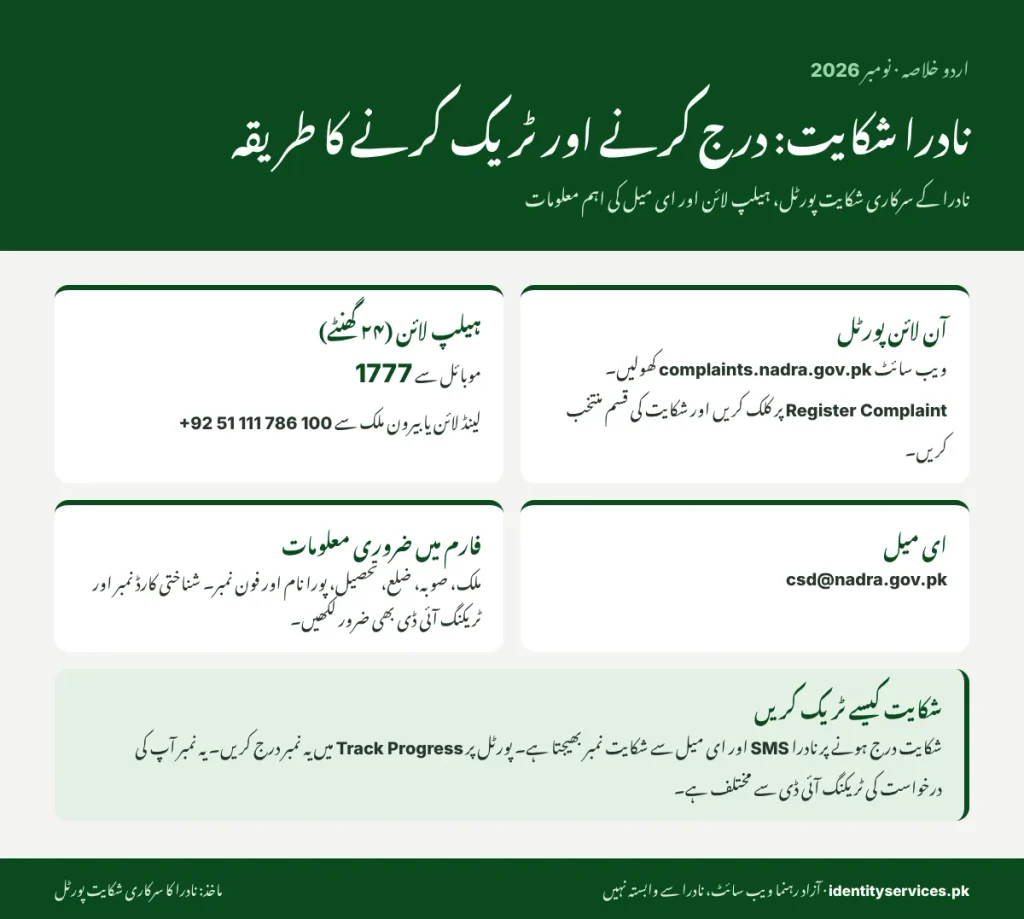
Ways to file a NADRA complaint
| Channel | Where | Best for | You get a complaint number? |
|---|---|---|---|
| Online portal | complaints.nadra.gov.pk → Register Complaint | Any service problem; you can attach documents | Yes, by email and SMS |
| Helpline | 1777 (Jazz, Ufone, Telenor, Zong); +92 51 111 786 100 (landline, overseas) | Urgent problems, people without internet | Ask the agent for it |
| [email protected] | A written record with attachments | Not stated by NADRA | |
| PakID quick chat | nadra.gov.pk → Contact Us → chat | Quick questions on an online application | No, it is a chat |
| Social media | NADRA’s official Facebook and X pages | Public follow-up when other channels fail | No |
NADRA calls the portal its “Complaint Management System”. The older address id.nadra.gov.pk/complaint still appears on some embassy pages, but NADRA’s own Customer Support page now points to complaints.nadra.gov.pk.
How to register a complaint online? Step by step
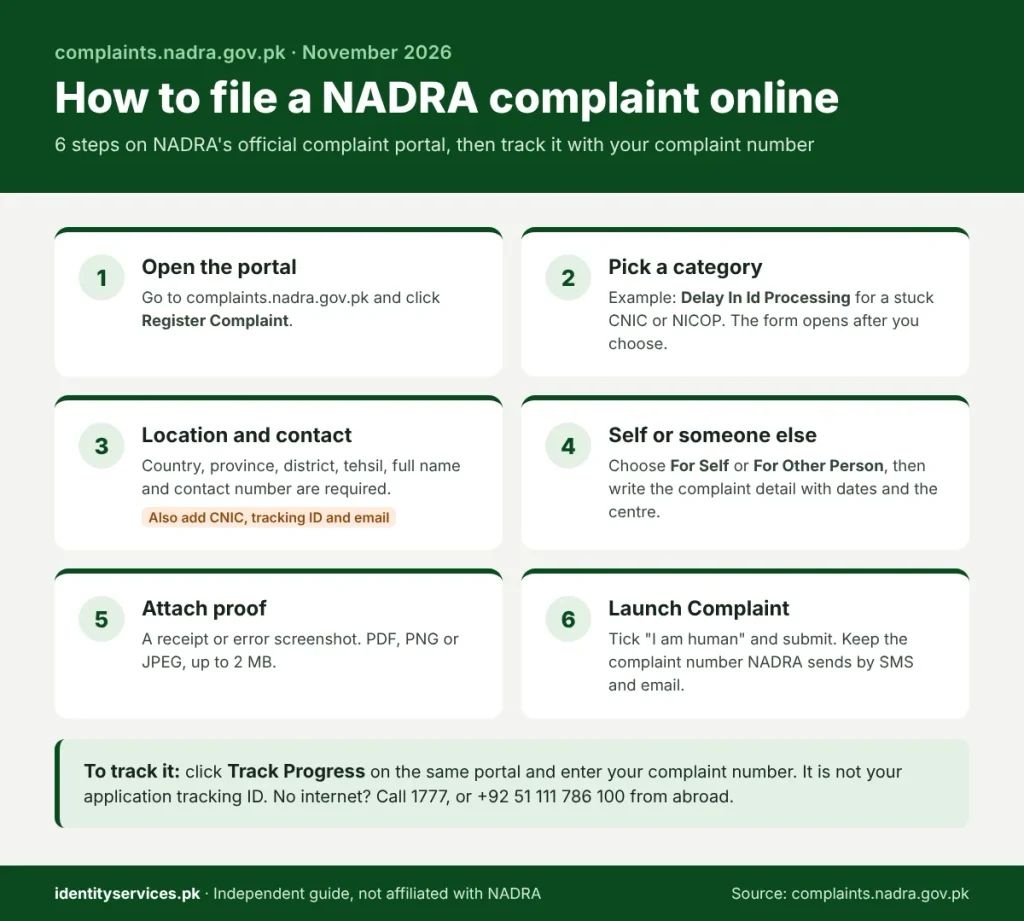
- Open complaints.nadra.gov.pk and click Register Complaint. Use Submit Query for a question and Submit Suggestion for feedback.
- Pick a Complaint Category from the list (see the table below). The form fields open after you choose one.
- Choose your country, province, district and tehsil, then enter your full name and contact number (with the international dialing code if you are abroad). These are required. Your citizen number (CNIC), tracking ID and email are optional, but add all three: the tracking ID lets NADRA find your application, and the email gets you a written copy of the complaint number.
- Under Type, choose For Self or For Other Person. If you file for someone else, pick your relation: Blood Relative, Neighbour, Friend or Other. Then write the complaint detail: what happened, the NADRA centre or service, and the dates.
- Attach a receipt or a screenshot of the error if you have one. The portal accepts PDF, PNG and JPEG files up to 2 MB.
- Tick the “I am human” check and click Launch Complaint. Keep the complaint number from the email and SMS that follow.
Which complaint category to choose?
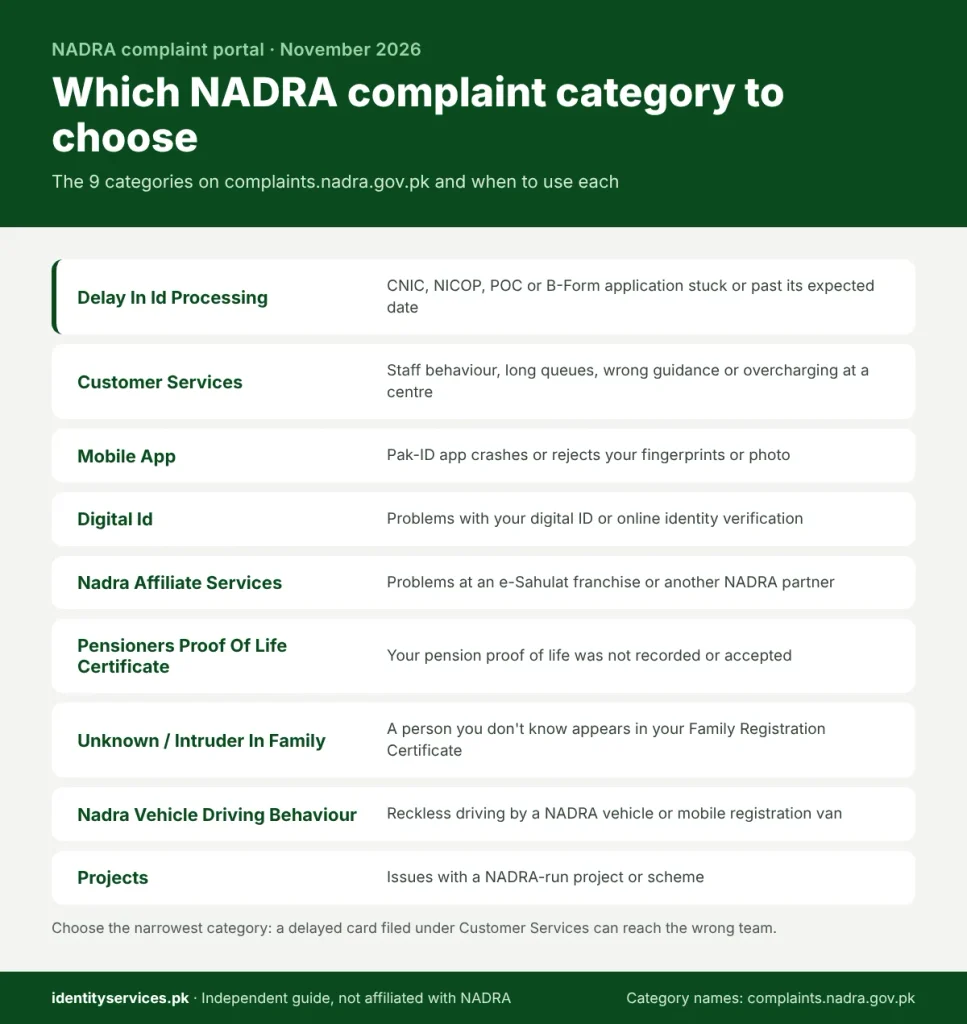
| Category on the portal | Use it when |
|---|---|
| Delay In Id Processing | Your CNIC, NICOP, POC or B-Form application is stuck or past its expected date |
| Customer Services | Staff behaviour, queues, wrong guidance or overcharging at a NADRA centre |
| Digital Id | Problems with your digital ID or online identity verification |
| Mobile App | The Pak-ID app fails, crashes or rejects your fingerprints or photo |
| Nadra Affiliate Services | Problems at an e-Sahulat franchise or another NADRA partner |
| Pensioners Proof Of Life Certificate | Your proof of life for a pension was not recorded or accepted |
| Unknown / Intruder In Family | A person you don’t know appears in your Family Registration Certificate (FRC) |
| Nadra Vehicle Driving Behaviour Complaint | Reckless driving by a NADRA vehicle, including mobile registration vans |
| Projects | Issues with a NADRA-run project or scheme |
How to track a NADRA complaint?
NADRA complaint tracking needs only your complaint number.
On complaints.nadra.gov.pk, click Track Progress, enter the complaint number, complete the “I am human” check and click Search Complaint.
The page shows where your complaint stands. If you lost the number, search your email and SMS from the day you filed, or call 1777 with your CNIC number.
A complaint number is not your application tracking ID. The tracking ID is printed on your application receipt and shows your card’s progress. To check that, see our guide to checking your NADRA tracking ID.
What happens after you file?
NADRA says each complaint goes through five stages:
- Registration: you lodge it and receive an email and SMS with the complaint number, date and expected resolution time.
- Assignment: the system routes it to the right department, region and team.
- Monitoring: senior management sees every open complaint on a live dashboard.
- Status: you can check progress on the website at any time.
- Resolution and feedback: NADRA informs you by email and SMS, and its call centre may call you to rate the service.
How fast NADRA resolves complaints?
NADRA publishes live complaint figures on its Customer Support page. On 12 November 2026 it showed 1,975,537 complaints received and 1,921,480 resolved, or 97.3%. Of the 2,287 complaints still pending, 1,154 were under 24 hours old and 405 were older than 72 hours. So most complaints close within three days, but about 1 in 6 open complaints waits longer.
If your complaint passes its expected resolution time, call 1777 with the complaint number and ask for escalation. Overseas Pakistanis can also use the Overseas Pakistan Grievance link in the footer of nadra.gov.pk.
Tips that get complaints resolved faster
- Put your tracking ID, the centre name and the date in the first line of the complaint.
- Choose the narrowest category. A delayed card filed under Customer Services can be routed to the wrong team.
- File one complaint per problem. Repeat complaints on the same issue can slow things down.
- Never share your PIN code or one-time passwords. NADRA does not ask for payment to resolve a complaint.
FAQ
How do I complain to NADRA?
Use complaints.nadra.gov.pk, call 1777 (or +92 51 111 786 100 from abroad), or email [email protected].
What is the NADRA complaint number?
The phone number for complaints is the helpline, 1777. Your own complaint number is the reference NADRA sends by email and SMS after you file.
What is the NADRA complaint email address?
Does NADRA have a WhatsApp number for complaints?
NADRA’s Contact Us and Customer Support pages list no WhatsApp number. Treat any WhatsApp number offering NADRA help as unofficial.
How do I check my NADRA complaint status?
Open Track Progress on complaints.nadra.gov.pk and enter your complaint number.
Can I file a NADRA complaint for someone else?
Yes. On the form, choose For Other Person and select your relation to them: Blood Relative, Neighbour, Friend or Other.
Can I file a NADRA complaint from abroad?
Yes. The online portal works from any country, and the overseas helpline is +92 51 111 786 100.
Can I complain about a delayed CNIC or NICOP?
Yes. Choose the “Delay In Id Processing” category and include your tracking ID.
Is the NADRA helpline open 24 hours?
Yes. NADRA lists its call centre timings as 24/7.


